

































How Boomi helps
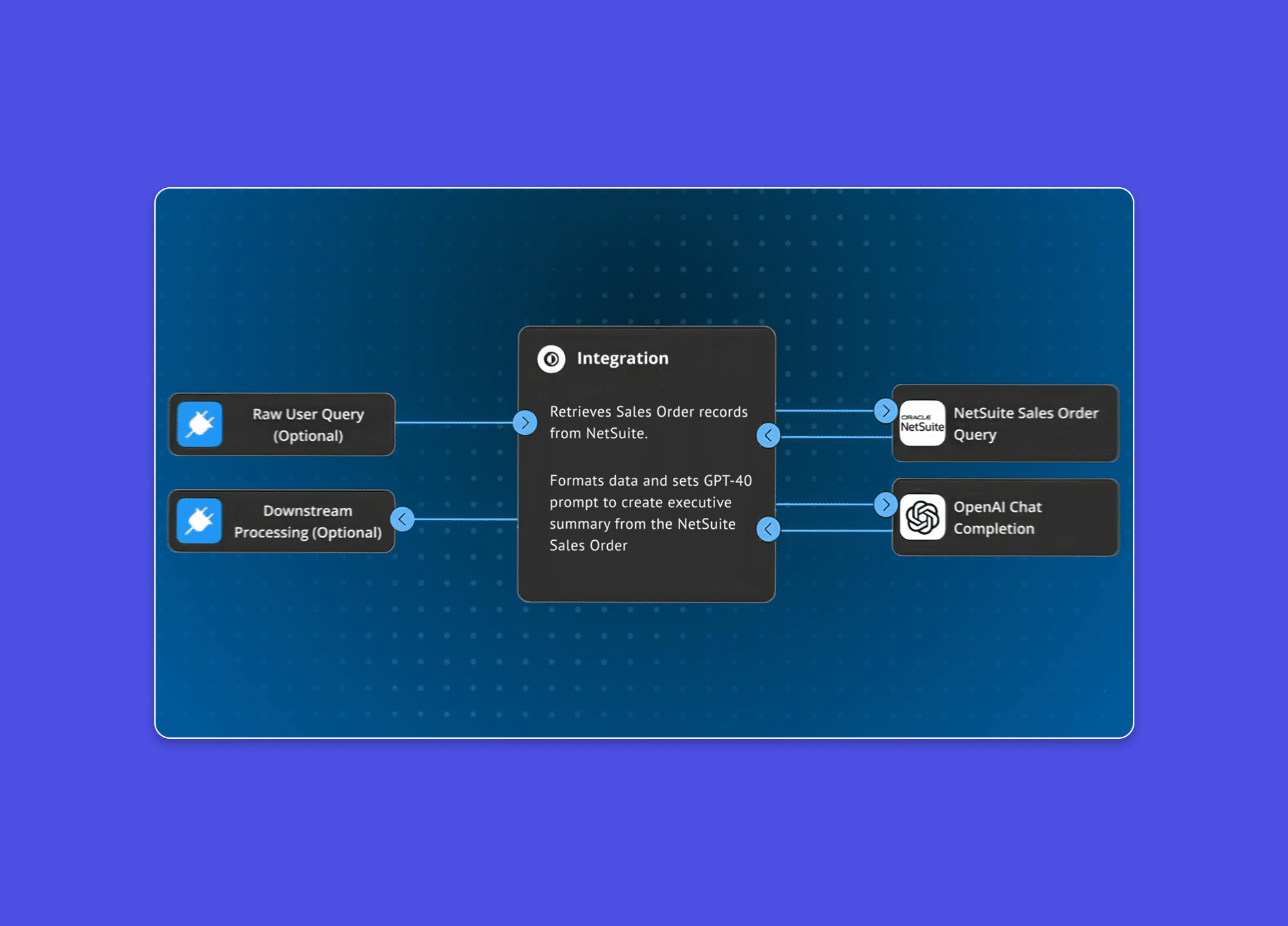
Break down data silos and turn your ERP into an engine for growth. Boomi seamlessly connects NetSuite to your entire enterprise, grounding your AI agents in trusted data to automate complex workflows, eliminate manual friction, and accelerate time-to-value.
Why Boomi
Help your teams move faster with an intuitive platform that simplifies NetSuite integration and adapts as your business grows.

Accelerate business outcomes
Implement faster with an intuitive low-code platform that simplifies ERP integrations.

Ground enterprise systems
Power AI agents with trusted NetSuite data to automate complex operational tasks.

Scale securely and confidently
Protect critical data with FedRAMP, SOC 1/2/3, and HIPAA–certified compliance.

Deliver unified data visibility
Eliminate data silos to deliver a real-time single source of truth across teams.
NetSuite Integration use cases
Common workflows teams automate across finance, sales, commerce, and operations.

Automate order to cash
Connect revenue lifecycles for scalable growth. Sync orders, Accelerate cash confidence, and reduce complexity.

Connect source-to-pay
Move from spend to strategy with lower processing costs, and reduced risks.

Modernize your ERP
Orchestrate data from legacy ERP systems and modern cloud applications to streamline your business with reliable data.
Optimize inventory and fulfillment workflows
Sync items, pricing, and stock levels to keep inventory accurate and fulfillment running smoothly.
Join teams transforming their business with Boomi and NetSuite
Experience measurable outcomes quickly: faster closing cycles, reduced integration time, and improved data accuracy to power your business.
Nutanix boosts scalability with Boomi Managed Cloud Services

Our journey with Boomi has been incredible. Boomi plays a critical role in synchronizing our business processes, breaking down silos, driving efficiencies, and helping us adapt seamlessly to business model changes.


Smartsheet Transforms Its Sales Order Process With Boomi
The fast-growing SaaS vendor has automated its order-to-cash to handle a 2X increase in sales orders while improving customer service
Boomi’s unified platform delivers outstanding value for integrations in an ever-changing environment.


Secrid accelerates growth with integration automation
We draw a circle around all of our software, maintaining everything through one language, using one platform and with one consultant – and that’s Boomi.


HappyOrNot closes the books faster to scale globally
With Boomi, we’ve shifted from reactive to proactive mode because we don’t have to run around like headless chickens. We can predict, plan, and analyze the business with accurate numbers. Everything runs smoothly, and we can scale faster.


Build an AI-ready NetSuite foundation
Get practical guidance, proven workflows, and expert tips to help you connect NetSuite with confidence.
How It Works
Integrate in minutes, not months. Leverage the guidance of over 200M machine learning integrations. Spend more time on innovation and less on maintenance with an AI powered platform.
Build NetSuite workflows with AI-driven speed
Connect NetSuite to your entire ecosystem – CRM, Finance, Commerce, and Supply Chain – using a low code interface that empowers your team to deliver results faster.

Unify your global ecosystem in real time
Trust your customer, order, and inventory data stays perfectly in sync across every system whether using REST, SOAP or pre-built enterprise connectors.

Govern with confidence and control
Proactive alerts and automated retry logic keep your mission-critical NetSuite workflows running smoothly, while comprehensive security certifications protect your data at every step.

NetSuite integration features
Built for the way your business (and NetSuite) actually operates.

Native SuiteTalk support
Connect via REST or SOAP APIs to sync records, transactions, and custom objects without writing code.

Custom record mapping
Seamlessly sync NetSuite customizations, including custom segments, fields, and unique data structures.

Saved search integration
Pull precise datasets directly from NetSuite to reduce API overhead – no manual exports or scripts required.

Advanced data transformation
Normalize data between systems using a visual drag-and-drop interface and reusable logic.

Resilient error handling
Minimize downtime with built-in retry logic, proactive alerting, and granular execution logging.

Multi-subsidiary ready
Orchestrate data across NetSuite OneWorld units while maintaining strict entity and financial alignment.
Get started with NetSuite integration
Connect NetSuite in just a few steps and start building workflows that streamline your business.

Create your Boomi account
Sign up for a free trial to access the Boomi Enterprise Platform, integration tools, and pre-built templates.

Connect to NetSuite using our connector
Authenticate your NetSuite account through SuiteTalk REST or SOAP. Configure connection details in minutes.

Start with a NetSuite template
Use pre-built NetSuite accelerators for CRM, order-to-cash, and inventory updates to move your business at the speed of AI.
NetSuite resources
Explore all resources



FAQs
Stop treating your ERP like a static database and start using it as a dynamic engine for growth. Boomi provides the architectural foundation to eliminate integration debt, automate your most critical business cycles, and realize the full value of your NetSuite investment.
Boomi provides a secure, high-performance bridge between NetSuite and your entire tech stack – whether it’s legacy on-premise systems or modern SaaS like Salesforce and SAP. Using our certified connector, you can orchestrate the full data lifecycle (CRUD operations) across any NetSuite edition, including OneWorld. All communication is handled via secure, encrypted web services (XML over HTTPS), ensuring enterprise-grade security for your financial and customer data.
Explore NetSuite connector docs.
Currently, in Boomi’s NetSuite connector, NetSuite 2024.2 SOAP Web Services is selectable in the connection and the NetSuite connector is certified on NetSuite’s 2025.1 SOAP endpoint. A NetSuite REST connector is currently under development and Boomi plans to make it available in early 2026.
Explore NetSuite SOAP and REST updates.
While traditional custom-coded integrations can take months, Boomi customers typically move from design to deployment in weeks. By leveraging our certified NetSuite connector and low-code interface, you eliminate the need for manual SuiteScripting and complex API management.
To accelerate your deployment, you can use Boomi Accelerators and Recipes—pre-configured integration patterns for common workflows like Order-to-Cash or CRM-to-ERP sync. These templates provide a proven architectural foundation, allowing your team to focus on business logic rather than connectivity.
Boomi provides a robust library of pre-built assets to eliminate “blank page” development and ensure alignment with NetSuite best practices.
These are divided into two categories:
- Integration Recipes:
These are modular, peer-reviewed blueprints for common NetSuite tasks—such as syncing customer records with a CRM or pulling inventory levels into a webstore. They provide the fundamental mapping and logic needed to jumpstart a project. - Solution Accelerators:
These are high-performance, end-to-end packages designed for complex business cycles. Our most popular accelerators include Lead-to-Cash (NetSuite + Salesforce) and Omnichannel Commerce (NetSuite + Shopify/BigCommerce), which come with pre-configured workflows for orders, fulfillments, and financial reconciliation.
Browse 100+ NetSuite assets in the Boomi Marketplace.
Monitoring is handled natively through the Boomi Enterprise Platform dashboards, providing real-time visibility into the health and throughput of your NetSuite workflows. Unlike point-to-point scripts that require manual log checking, Boomi offers centralized governance to proactively identify bottlenecks before they impact your financial close or order processing. Boomi offers Execution insights, low-latency visibility, proactive alerting, and deep-dive troubleshooting.
Learn more in the Boomi Documentation:
- Integration Dashboards Overview:
A guide to tracking account activity, throughput, and error rates. - Monitoring Best Practices:
Expert strategies for exception-based monitoring and designing for architectural resiliency.
Technical resources
Access documentation, system status, and support resources to help you manage and maintain your NetSuite integrations.
Help documentation
Find detailed guidance on NetSuite connectors, configuration, authentication, and troubleshooting in Boomi Help.
Platform Status
Check the current status of Boomi services and view updates on availability, performance, and incidents.
Submit a ticket
Submit a support ticket to get help from Boomi experts with integration issues or platform questions.
Start building NetSuite integrations that keep your business moving
Move fast with a platform designed to automate your most important financial, sales, and operational workflows.